
Game Backlog1.33 - Google Play
You'll be able to see results in few seconds.
Publisher Description
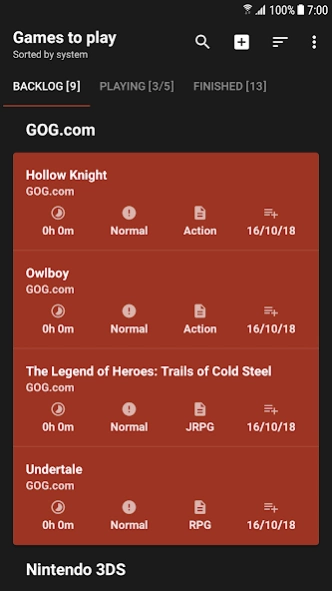

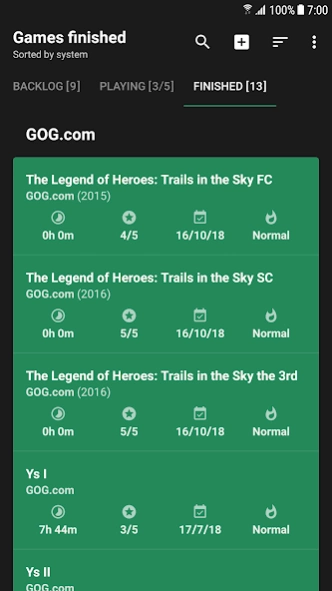
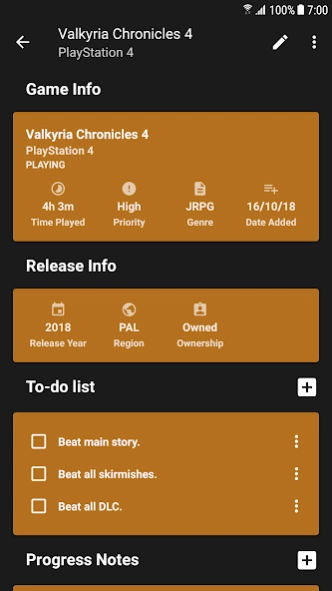
Manage your video game backlog and update your progress.
Manage your video game backlog and update your progress with
Game Backlog
.
- Add games to your
backlog
.
- Move games to
playing
when you start playing.
- Move games to
finished
when you beat them.
Add
additional info
to games such as:
• Time Played
• Priority
• Genre
• Release Year
• Region
• Ownership
• Purchase Info
• Achievements
• Images
• Review
• Rating
• Game Of The Year
• Favorite
• Custom fields (Text, Numbers, Boolean, Dates)
Sort
your games through their game info.
Add
custom systems
if one doesn't exist in the given list.
Import your Steam games
from your Steam account.
Import your Steam achievements
for your Steam games if they exist.
Search
all games via their title.
Keep track of your progress by adding a
to-do list
and
progress notes
.
Track your gameplay session playtimes for each game.
Create a rankable
wishlist
.
Customise
the appearance of the app by changing:
• Theme (Dark, Light, Custom)
• Game background, text and divider colors
• Game card layout (icons and text)
Backup and Restore
your games to
Google Drive
and
Phone Storage
.
Set
limits
on the games you are currently playing.
About Game Backlog
The company that develops Game Backlog is Andrew Lee Apps. The latest version released by its developer is 1.33.
To install Game Backlog on your Android device, just click the green Continue To App button above to start the installation process. The app is listed on our website since 2021-03-29 and was downloaded 0 times. We have already checked if the download link is safe, however for your own protection we recommend that you scan the downloaded app with your antivirus. Your antivirus may detect the Game Backlog as malware as malware if the download link to com.andrewleeapps.gamebacklogapp is broken.
How to install Game Backlog on your Android device:
- Click on the Continue To App button on our website. This will redirect you to Google Play.
- Once the Game Backlog is shown in the Google Play listing of your Android device, you can start its download and installation. Tap on the Install button located below the search bar and to the right of the app icon.
- A pop-up window with the permissions required by Game Backlog will be shown. Click on Accept to continue the process.
- Game Backlog will be downloaded onto your device, displaying a progress. Once the download completes, the installation will start and you'll get a notification after the installation is finished.
Program Details
System requirements
Download information
Pricing
Version History
version 1.33
posted on 2021-03-29
Version 1.33 29th March 2021
. Added Session Playtime Tracker to Game Detail screen.
→ Tap Playtime icon in Game Info card to show stopwatch.
→ Stop button automatically adds elapsed time to playtime.
. Sort games by GOTY and favorites.
. Graphs screen now shows charts for all years in database (swipe horizontally)
. Stats Info screen now shows GOTY list.
version 1.32
posted on 2021-02-25
1.32
. Added option in Settings to Update existing Steam games/achievements
(Steam games update will only work if Steam games have their Steam AppID set, Steam games must have their title set to their originals to fetch Steam AppId initially)
. Hide/Unhide Steam games in Steam Import
. Update/fetch achievements from Steam API in Achievements List
. Steam AppId info in Game Detail Release Info (Steam games only).
. Show/Hide layout checkbox menu items now submenu
version 1.31
posted on 2021-01-08
Version 1.31
Hopefully fixed crashing in Add Game and Statistics Overview
version 1.22
posted on 2020-12-12
- Automatically get game info from IGDB API when adding/editing games
(Can be turned off in Settings General)
- Made image thumbnail art clearer, less pixelated.
- Find and add upcoming games to Wishlist via IGDB API
- Change date formatting in progress notes/reviews in Settings General.
- Added 'Bulk Edit' option in toolbar for bulk changing system, moving games to other lists.
- Added option for moving games to other lists in long click popup menu
version 1.21
posted on 2020-11-07
- Backup/Restore should work again. (Uses 'Storage Access Framework')
- Steam Import should work again (Also imports Steam Achievements now)
- Fixed app icon not appearing on some devices.
- Can add Developer, Publisher info to games
- Can set Developer, Publisher info on game cards.
- Can sort lists by Developer, Publisher and Purchase Price
- 'Total hours played' and 'Total money spent' added to Statistics Overview
- Added Epic, Epic Games Store, Xbox One S/X, Xbox Series S/X to System List.
version 1.2
posted on 2019-03-28
Game Backlog Version 1.2
28th March 2019
- Autocomplete drop-down for Game Titles (Add Game, Edit Game, Add Wishlist, Edit Wishlist)
- 'Share' in main options menu:
> Share list of your backlog, playing, finished, wishlist with others via message, tweet, email, etc.
- Added Apple Arcade, Google Stadia and PlayStation 5 to 'Systems' list
Disclaimer
Official Google Play Link
We do not host Game Backlog on our servers. We did not scan it for viruses, adware, spyware or other type of malware. This app is hosted by Google and passed their terms and conditions to be listed there. We recommend caution when installing it.
The Google Play link for Game Backlog is provided to you by apps112.com without any warranties, representations or guarantees of any kind, so access it at your own risk.
If you have questions regarding this particular app contact the publisher directly. For questions about the functionalities of apps112.com contact us.
